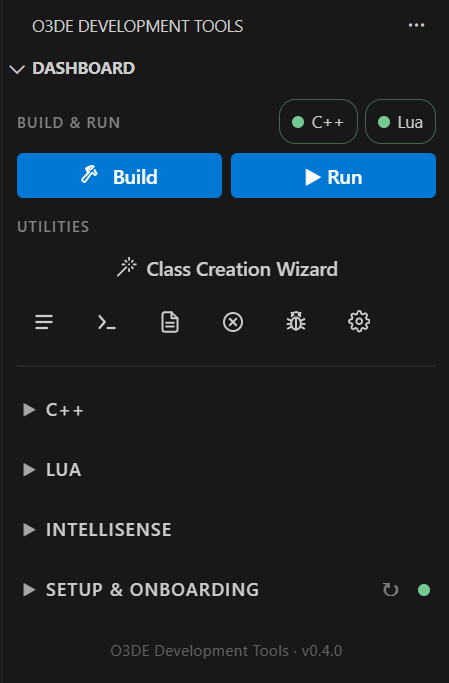
Built around O3DE
O3DE Development Tools is a VS Code extension made for O3DE projects specifically. It works from your registered engine, your project, and its gems, and connects directly to O3DE’s own build, debugging, and scripting systems.
It onboards every dependency a project needs, sets up an optimal workspace, and covers the full development loop from there: configure, build, run, and debug, in both C++ and Lua.
For project management and engine and asset deployment, it pairs with Opal Launcher. Together they cover O3DE development from both sides.
See the full dashboard walkthrough in the docs.
Setup & Onboarding
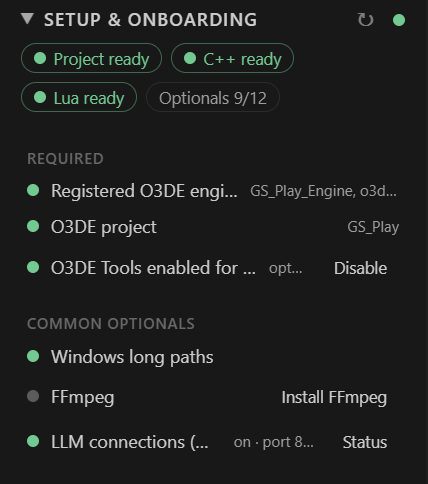
Checks everything O3DE development depends on, from the engine and platform toolchain to the language servers and gems, and fixes what’s missing in one click. Workspace setup generates the VS Code settings, launch configurations, and code snippets for your project.
C++
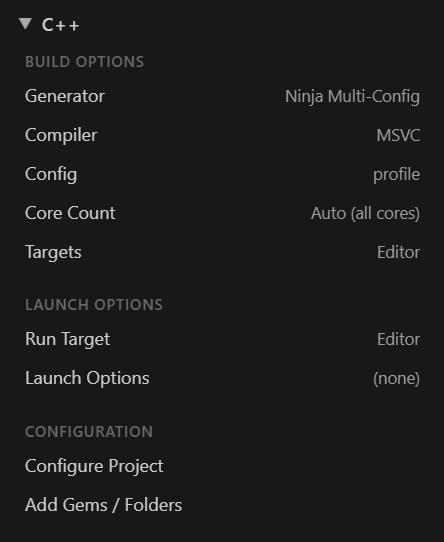
Configure, build, run, and debug through CMake, with O3DE’s generators, compilers, and targets. Launch configurations for the Editor, GameLauncher, and your other targets are generated for you.
Lua

Debug scripts against a running Editor or GameLauncher over O3DE’s RemoteTools protocol, with breakpoints, stepping, and watch. The Lua Palette browses the engine’s reflected scripting API and inserts calls at the cursor.
IntelliSense
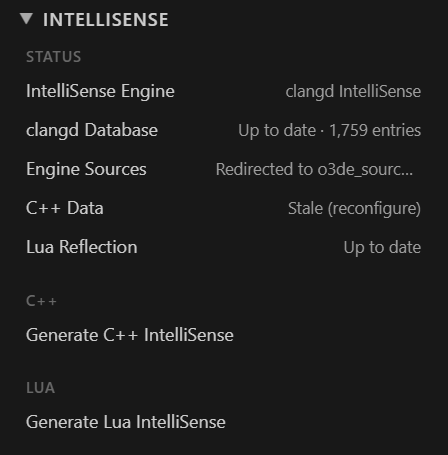
C++ and Lua code insight generated from your own project and engine: the CMake File API for C++, and a dump of the reflected scripting API for Lua. Status rows show when either has gone stale and needs regenerating.
Get it now
Available for Windows and Linux.
O3DE Development Tools is an unofficial, community-built extension from Genome Studios. It isn’t affiliated with, endorsed by, or sponsored by the Open 3D Foundation or the Linux Foundation.