Setup & Onboarding
Setup & Onboarding checks everything the tools depend on and offers a one-click fix for what’s missing: install, enable, or configure. A status light and re-scan button sit in the header, beside readiness pills for Project, C++, and Lua, and a count of optionals met.
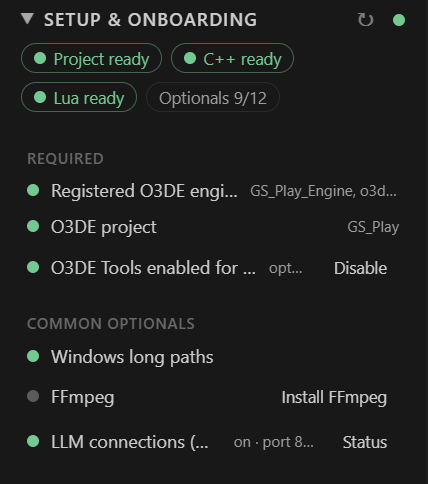
- Required: a registered O3DE engine, an O3DE project, and O3DE Tools enabled for this project. The extension is opt-in per project. It asks once when you open an O3DE project, and a non-O3DE workspace stays fully dormant.
- Common optionals: Windows long paths, FFmpeg, and LLM connections.
- LLM connections are off by default and set per project. When on, a local MCP endpoint, bound to
127.0.0.1, lets an assistant such as Claude build, run, read structured build results, and read or change build configuration.
Choose C++ setup or Lua setup to see that track’s checks.
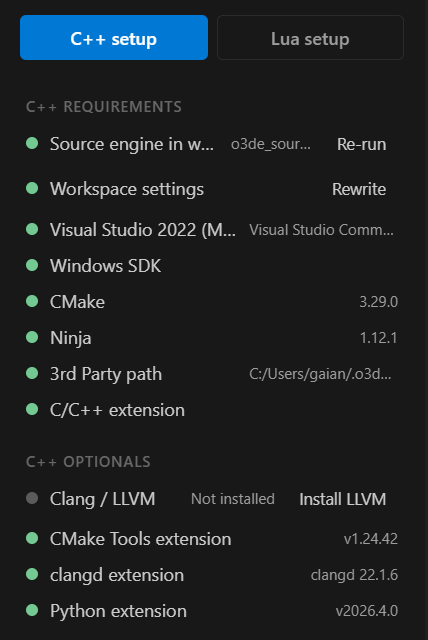
C++ requirements
- Source engine in workspace and Workspace settings run the guided workspace setup: one multi-root workspace holding your project, the engine source, and gems. It generates
.vscodesettings, alaunch.json(Editor, GameLauncher, Attach, Class Creation Wizard), and O3DE code snippets. Re-run and Rewrite redo them. - The toolchain for your platform: Visual Studio 2022, Windows SDK, CMake, and Ninja on Windows. Clang or GCC, CMake, and Ninja on Linux.
- The 3rd Party path and the C/C++ extension.
C++ optionals: Clang / LLVM, CMake Tools, clangd, and Python. An optional item that’s absent reads Not installed on a neutral dot, never a red fault.
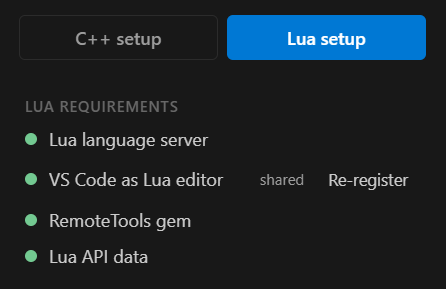
Lua requirements
- Lua language server (
sumneko.lua), which provides completion and hovers. - VS Code as Lua editor, so O3DE’s Open Lua Editor opens scripts here. Re-register repeats the one-time registration.
- The RemoteTools gem, which the debugger connects through.
- Lua API data, the dump of O3DE’s reflected scripting API that IntelliSense and the palette read.
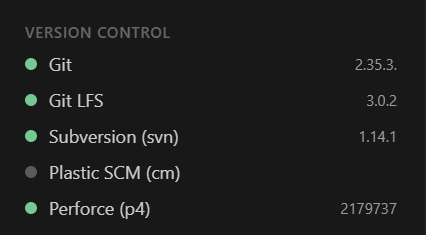
Version Control detects Git, Git LFS, Subversion, Plastic SCM, and Perforce, and shows the installed version of each.